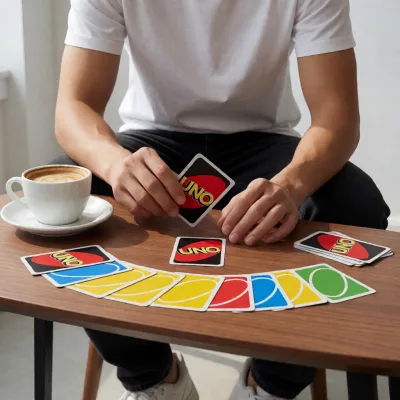
UNO Online: Classic Card Fun in Your Browser
UNO Online brings the familiar color-matching card game straight to your browser. There is no large installation package, complicated setup, or extra launcher required. Open the game, choose your preferred table, and start playing within seconds. It is a quick pick for casual players, families, and anyone searching for a simple browser arcade game with competitive twists.
You can play the hosted version at UNO Reverse Card game online. The game is designed for fast rounds, easy controls, and straightforward rules. It works best in an updated version of Chrome, Edge, Firefox, or Safari. For official background on the original card game, visit the official Mattel UNO page.
How to Play UNO Online
Each player receives a hand of cards, while one card starts the discard pile. On your turn, place a card that matches the current card by color, number, or action symbol. If you cannot make a legal move, draw a card and follow the table rules. The goal is simple: get rid of every card in your hand before your opponents do.
UNO Card Rules Explained
- Skip: The next player loses their turn.
- Reverse: The direction of play changes. In a two-player match, it commonly acts like a Skip card.
- Draw Two: The next player draws two cards and misses their turn.
- Wild: Choose the color that continues the round.
- Wild Draw Four: Change the color and force the next player to draw four cards. Use it only when you do not have a playable card of the current color, depending on the active ruleset.
When only one card remains in your hand, use the UNO button immediately. Missing the call may trigger a penalty in versions that enforce the rule. Keep an eye on the discard pile, because action cards can change the entire table in one move.
UNO Online Game Features
- Fast browser-based card matches.
- Simple mouse, touch, and keyboard-friendly controls.
- Color, number, and action-card gameplay that is easy to learn.
- Short rounds that work well on desktop and mobile screens.
- No heavy download required; just load the hosted game and play.
The interface may vary depending on the hosted version and device. If the game does not load correctly, refresh the page, disable conflicting browser extensions, or open it in a private window. Updated browsers also provide better HTML5 support. You can check current browser standards through the MDN HTML documentation.
Pro Tips to Win More UNO Matches
- Save Wild cards: Do not waste them early unless changing color gives you a clear advantage.
- Watch opponent hands: If a player repeatedly draws, remember which colors they may lack.
- Use action cards strategically: Skip and Reverse cards are valuable when an opponent has only a few cards left.
- Change colors wisely: Choose the color you hold most often, not simply the color you prefer.
- Track high-value cards: Getting rid of Draw Four, Wild, and Draw Two cards reduces your risk if another player wins first.
Frequently Asked Questions
Is UNO Online free to play?
Yes. The browser version hosted at unoreverse.com can be opened directly without installing a desktop game client. Availability and features depend on the hosted page.
Can I play UNO Online on mobile?
Yes, the game can be played on many modern phones and tablets. Rotate your device if the table feels cramped and keep your browser updated for smoother HTML5 performance.
What should I do if the game gets stuck?
Refresh the page, clear temporary browser data, switch browsers, and temporarily disable ad-blocking or script extensions that may interfere with the game area. A stable internet connection also helps.
Final Verdict
UNO Online is a quick, accessible card game for browser players who want classic matching-card action without a lengthy download. Follow our simple step-by-step guide, manage your Wild cards, call UNO on time, and use action cards to pressure opponents. Load the hosted game, invite friends when supported, and enjoy fast rounds with no complicated setup.



Comments (0)
No comments yet. Be the first to start the discussion!